




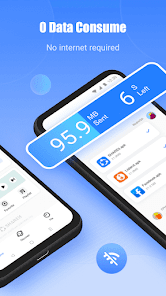
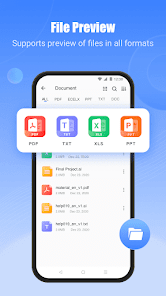
SHAREit is a popular mobile app that offers a variety of features for users. One of the main features is the ability to transfer files and data between devices at high speeds without the need for an internet connection. This makes it convenient for users to share large files such as videos, photos, and documents with friends and family.
Another feature of SHAREit is its built-in media player, which allows users to enjoy music and videos directly within the app. This eliminates the need to switch between different apps for file transfer and media playback. Additionally, SHAREit also offers a built-in photo and video library, making it easy for users to organize and access their media files.
Furthermore, SHAREit has a built-in tool for backing up and syncing contacts, messages, and other data from a mobile device to another. This feature ensures that users can easily transfer important information between devices without the risk of data loss.
Using SHAREit is simple and straightforward. After downloading and installing the app, users can open it and select the "Send" or "Receive" option, depending on whether they want to send or receive files. To send files, users can choose the files they want to share and select the recipient's device. To receive files, users need to wait for the sender to initiate the transfer and then accept the incoming files.
SHAREit also offers the option to connect to nearby devices using the app's built-in hotspot feature, making it easy to share files with friends and family in close proximity. Additionally, the app provides a user-friendly interface and intuitive controls, making it accessible for users of all technical levels.
Pros:
1. Fast file transfer speeds without the need for an internet connection.
2. Built-in media player for seamless playback of music and videos.
3. Easy to use and user-friendly interface.
Cons:
1. Can be prone to security vulnerabilities and privacy concerns.
2. Contains ads that can be intrusive for some users.
3. Limited cross-platform compatibility, primarily designed for Android and iOS devices.
transfers large files very quickly, love it.
this app are so legend for transferibg apps like special forece
good app for quick shere
wujs vbbh
lmran TCd
Review Source: Google Play store public user reviews.
Yes, users can usually submit suggestions or feedback directly within the app or through the official SHAREit website or support channels, allowing the developers to consider user input for future updates.
SHAREit: Transfer, Share Files may collect certain user data to enhance the app's functionality and user experience, but it is advisable to review their privacy policy for specific details on data collection and usage.
Yes, SHAREit: Transfer, Share Files supports offline use, allowing users to transfer files between devices without the need for an active internet connection, utilizing Wi-Fi Direct technology instead.
To cancel a SHAREit: Transfer, Share Files subscription, users typically need to go through the app store or platform where the subscription was purchased and follow the cancellation instructions provided there.
SHAREit: Transfer, Share Files may offer premium features through a subscription, but the pricing can vary based on the region and the specific features selected. Users should check the app for the most current pricing information.
No, once activated, your customer number cannot be changed. Please contact customer service for further inquiries.
It's not recommended to share your customer number for security reasons. Keep it confidential and contact customer service if needed.
To log in, open the app and enter your registered email or phone number and password.
If you face activation issues, please contact customer service through the app for immediate assistance.
You can reach customer service through the app's help section or visit the official SHAREit website for support options.
























 Home
 Apps
 Games
 Windows
 Topics
 Terms of Service
 Privacy & Policy
 About Us