
Advertiser and Editorial Disclosures

FaceApp: Perfect Face Editor

FaceApp: Perfect Face Editor

4.3
Rating
500,000,000+ Downloads
/ Version
Advertisement(PageType: detail | Position: pre3 )
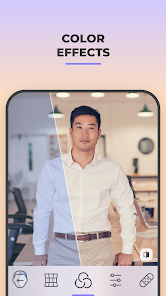
Screenshot 1
Screenshot 2
Screenshot 3
Screenshot 4
Screenshot 5
Screenshot 6
Screenshot 7
Screenshot 8
Screenshot 9

Information

  • Category: Photography
  • Price: free
  • Age Rating: Everyone
  • Available on: /
  • Developer: FaceApp Technology Ltd
  • Updated on: Jun 8, 2026
Advertisement(PageType: detail | Position: pre4 )
FaceApp: Perfect Face Editor is a powerful AI-based photo editing app that transforms your selfies with just a few taps. Whether you want to enhance your natural beauty, try different hairstyles, or see how you would look in the future, FaceApp provides stunning and realistic edits. With advanced AI filters, retouching tools, and fun transformations, you can create magazine-quality photos effortlessly.

Features

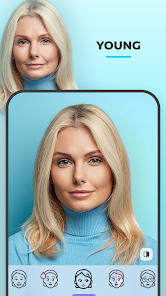
  • AI Face Filters: Apply age filters, gender swap, and other fun transformations with AI-powered editing.
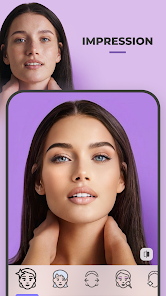
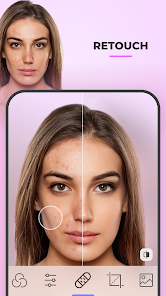
  • Beauty Retouching: Smooth skin, remove blemishes, whiten teeth, and reshape facial features for a flawless look.
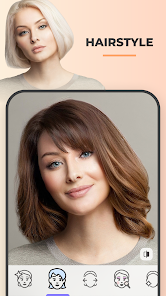
  • Hairstyle and Beard Styles: Try different hair colors, trendy hairstyles, or various beard styles instantly.
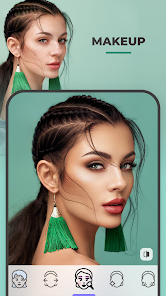
  • Makeup and Enhancements: Apply natural or bold makeup looks with AI-based effects.
  • Background Editor: Replace or blur backgrounds to create professional-looking portraits.
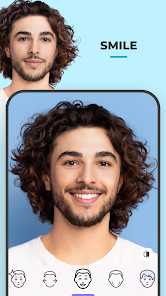
  • Smile and Expression Editor: Add a smile, adjust expressions, or even swap faces with a single tap.

Pros

  • High-Quality Edits: AI technology creates realistic and professional-looking photo enhancements.
  • Easy to Use: Simple, user-friendly interface for quick and effortless editing.
  • Fun and Creative: Enjoy age swaps, gender changes, and other entertaining filters.
  • Regular Updates: New features and filters are frequently added.
  • Cons

  • Watermark in Free Version: The free version applies a watermark to edited images.
  • Some Features Require Subscription: Advanced editing tools and filters are locked behind a premium subscription.
  • Privacy Concerns: AI-based processing requires uploading images to FaceApp's servers, which may raise data privacy concerns.
  • How to Use FaceApp

    Using FaceApp is simple and requires only a few steps:

    1. Download and Install: Get FaceApp from the App Store or Google Play and install it on your device.
    2. Select a Photo: Choose a selfie from your gallery or take a new photo directly in the app.
    3. Apply Filters and Edits: Use AI tools to enhance your face, try hairstyles, or change your age.
    4. Adjust and Customize: Fine-tune filters, brightness, contrast, and other settings for a perfect look.
    5. Save and Share: Download your edited image and share it on social media or with friends.

    FaceApp is the perfect tool for anyone who loves creative and professional face editing. Whether for fun or serious retouching, it offers high-quality transformations with ease!

    Pros
    • Transform your selfies with realistic age and gender filters for fun results.
    • Enjoy a vast array of editing tools to enhance your photos effortlessly.
    • Experiment with different hairstyles and colors to find your perfect look.
    • Easily share your edited images on social media platforms with a single click.
    • User-friendly interface makes photo editing accessible for everyone, regardless of skill level.
    Cons
    • Limited editing features may not meet professional standards
    • Privacy concerns arise from data usage policies
    • Heavy app size can slow down device performance
    Advertisement(PageType: detail | Position: pre5 )
    Advertisement(PageType: detail | Position: pre7 )

    User Reviews

    (5.35M Reviews)
    • Biswanath Kejariwal
      2026/07/06

      best

    • Anita Waibel
      2026/07/06

      love this

    • Tracy Longstaff
      2026/07/06

      a great little app in Pro Mode. not bad before I bought Pro too.

    • Tia B
      2026/07/06

      love this app. Always give me the best touch ups

    • Mide in Pakistan
      2026/07/06

      super nice

    Review Source: Google Play store public user reviews.

    FAQ

    Can I submit suggestions or feedback to FaceApp: Perfect Face Editor?

    Yes, users can submit suggestions or feedback through the app's support section or by contacting their customer service directly via email.

    Does FaceApp: Perfect Face Editor collect my personal data?

    Yes, FaceApp: Perfect Face Editor may collect personal data, including user-generated content and device information, as outlined in their privacy policy.

    Does FaceApp: Perfect Face Editor support offline use?

    FaceApp: Perfect Face Editor requires an internet connection for most of its features, as many of the filters and effects are processed on cloud servers.

    How do I cancel my FaceApp: Perfect Face Editor subscription?

    To cancel your subscription, you can go to the app store where you purchased it (Google Play Store or Apple App Store) and follow the instructions for managing subscriptions.

    How much does a subscription to FaceApp: Perfect Face Editor cost?

    The subscription cost for FaceApp: Perfect Face Editor varies depending on the plan chosen, typically offering monthly and yearly options at different price points.

    How to use FaceApp: Perfect Face Editor

    Can I change my customer number?

    Unfortunately, customer numbers cannot be changed. If you need assistance, please contact our customer service team.

    Can customer service help me with app features?

    Yes, our customer service team can assist you with any questions regarding app features. Just reach out via the help section.

    How can I contact customer service for FaceApp?

    You can reach our customer service through the app's help section or email support directly at support

    How can I update my account information after activation?

    You can update your account information in the app settings. If you need further assistance, please contact our support team.

    How do I activate my FaceApp account?

    To activate your account, follow the link sent to your email upon registration. If you didn't receive it, check your spam folder or contact support.


    What's New

    • Minor fixes and stability improvements are here for a smoother FaceApp experience.
    Advertisement(PageType: detail | Position: pre2 )